
Improve Candidate Ranking in SAP SuccessFactors with AI Matching
by Lovepreet Singh
Seventy applicants. One requisition. And a list sorted by the date people clicked "apply."
If you recruit in SAP SuccessFactors, you know this screen. The best candidate for the role might be number 4 on the list. Or number 64. The only way to find out is to open every profile and read.
That's the gap search and match for SAP SuccessFactors is built to close. Instead of a date-ordered list, recruiters get every applicant scored against the job, ranked by fit, with the criteria in plain view.
Here's how it works, why it matters for high-volume hiring, and what to look for when you compare SAP SuccessFactors candidate matching options.
Why is the best candidate so hard to find in SAP SuccessFactors?
SAP SuccessFactors is very good at what it's built for: managing requisitions, applications and the hiring workflow from end to end. Capture is rarely the problem. With tools like the Recruiter Hub connectors for SAP SuccessFactors, most teams get candidates into the system without much trouble.
The slowdown comes after that, when a recruiter has to decide who to call first.
- The list is in date order. The default Job Applications view shows who applied first, not who fits best. Strong candidates who applied late sit at the bottom.
- Every recruiter scores differently. Without a shared method, one recruiter weighs skills heavily while another leans on degree or employer. Two people can rank the same pool in two different ways.
- Tradeoffs happen by gut feel. Does five years of relevant experience beat a stronger skill match? That call usually gets made in someone's head, with nothing written down.
- Checking fit means opening profiles. To confirm even basic details like total experience or current employer, a recruiter has to click into each record.
On a requisition with a handful of applicants, that's manageable. On a high-volume role, it's hours of reading before a single phone screen gets booked.
How do most teams handle candidate ranking in SAP recruiting today?
Most teams fall back on one of three habits.
The first is reading everything. It's thorough, but it doesn't scale, and the candidates reviewed late in the day get less attention than the ones reviewed first.
The second is keyword searching. Recruiters type a skill or title and hope the profiles use the same words. That's why semantic search in SAP recruiting gets so much attention: teams want search that understands that "QA analyst" and "manual tester" can describe the same person. Keyword search alone misses those matches, and it still doesn't tell you who fits best overall. Outdated or partial candidate records make it worse, which is why Data Reprocessing for SAP SuccessFactors is worth a look alongside any matching tool.
The third is shortlisting on instinct. A quick scan, a few names flagged, and the rest of the pool goes unread.
None of these give you what a hiring manager actually asks for from SAP SuccessFactors candidate matching: a ranked list, built on criteria everyone can see, that adapts to the role.
How search and match works in SAP SuccessFactors
RChilli's Search & Match for SAP SuccessFactors adds AI candidate matching and ranking directly inside the recruiter's existing screen. It runs through the RChilli Browser Extension, so recruiters don't switch tools or export data.
The flow is short:
- Open a job requisition's Job Applications list in SAP SuccessFactors.
- Open the RChilli Browser Extension sidebar and select the "Job Application" tab.
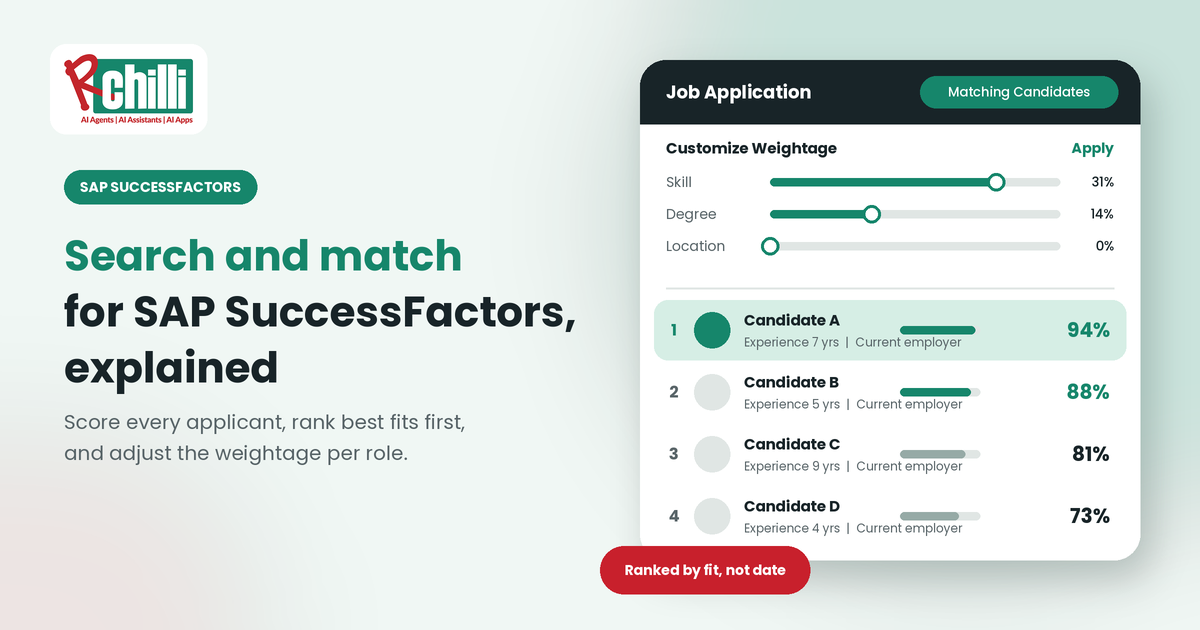
- The sidebar shows a "Matching Candidates" count for that requisition, with every applicant scored as a percentage match.
- Optionally, expand "Customize Weightage" and adjust the sliders.
- Click "Apply" and the list re-ranks instantly. There's no batch processing to wait for.
- Review each candidate's match percentage, total experience and current employer right in the sidebar, then shortlist your top fits.
Eight criteria, weighted your way
Every match score is a weighted combination of eight criteria. Here are the defaults:
| Criteria | Default weight | What it measures |
|---|---|---|
| Job Profile | 20% | Role title and function alignment |
| Skill | 21% | Required skills match |
| Degree | 20% | Education level fit |
| Organization | 21% | Industry and company background |
| Experience | 3% | Years of required experience |
| Location | 9% (3% each for city, state, country) | Geographic fit |
| Industry Type | 3% | Sector alignment |
| Domains | 3% | Domain expertise match |
The defaults are a starting point, not a rule. That's where this approach to SAP SuccessFactors candidate matching earns its keep.
Picture it on a real requisition
Say you're hiring a manual tester for a remote team, and the role draws a large applicant pool.
For this role, hands-on testing skills matter more than a specific degree. So you raise the Skill weight and lower Degree. Because the role is remote, you set all three Location weights to zero, so strong candidates in other cities aren't pushed down the list. Click Apply, and the ranking updates on the spot.
Now the top of the list shows the people most likely to succeed in this particular job. Your team lead can check each one's match percentage, experience and current employer before the phone screen, without opening a single full profile.
Hiring a field-based role next week? Raise Location back up. Hiring a senior leader? Give Organization and Experience more weight. A Reset button takes every slider back to the defaults whenever you switch role types.
Fewer duplicates, cleaner reviews
Candidates often arrive through more than one channel, such as the Browser Assistant, the Email Importer or a native SAP SuccessFactors application. The "Already Mapped" indicator flags anyone already captured from another source, so your team doesn't process the same person twice.
What changes for your recruiting team
| Without search and match | With search and match |
|---|---|
| Read every resume to estimate fit | A match percentage for every applicant, calculated automatically |
| Each recruiter ranks differently | One consistent, criteria-based ranking across the team |
| Date order buries strong candidates | Best-fit candidates surface at the top |
| Skills vs. experience decided by gut feel | Adjustable weightage per role |
| Open each profile to check the basics | Match %, experience and employer shown inline |
| No view into why a candidate ranks where they do | Transparent scoring built on visible criteria |
The biggest shift that search and match brings to SAP SuccessFactors is consistency. When the criteria are visible and adjustable, a ranking stops being one person's opinion and becomes something the whole team, and the hiring manager, can see and question.
What to check before choosing search and match for SAP SuccessFactors
If you're comparing options for SAP SuccessFactors AI matching, these questions will separate the useful from the flashy:
- Does it work inside SAP SuccessFactors? Recruiters won't adopt a tool that sends them to another tab.
- Can you see the criteria? If you can't explain why a candidate scored 82%, you can't defend the shortlist.
- Can you change the weights per role? A single fixed formula won't fit both a remote tester and an on-site plant manager.
- Does it handle duplicates? Multi-channel sourcing creates them, and they waste review time.
- What does it depend on? RChilli's Search & Match runs inside the RChilli Browser Extension, so check with your customer success manager that you're on the latest extension build that includes it.
Security you can take to your IT team
Candidate data is personal data, and your security team will ask how it's handled. You can share RChilli's data security and protection page with them. RChilli holds ISO 27001:2022 and SOC 2 Type II certifications and supports GDPR, HIPAA and PCI requirements, and is FedRAMP Ready.
Start with your busiest requisition
The longer a strong applicant sits at the bottom of a date-sorted list, the more likely they accept another offer first. You don't need a big rollout to see what search and match does for SAP SuccessFactors hiring. Pick your highest-volume open role, rank it, and compare the top ten against the shortlist your team built by hand.
RChilli powers clean data and accurate decisions for SAP SuccessFactors users worldwide. Explore the full set of RChilli solutions for SAP SuccessFactors, including AI Agents for SAP SuccessFactors, or request a demo to see Search & Match rank your own SAP SuccessFactors requisitions.
Frequently asked questions
What is Search & Match in SAP SuccessFactors? Search & Match is RChilli's AI candidate matching and ranking capability for SAP SuccessFactors Recruiting. It works through the RChilli Browser Extension on a requisition's Job Applications list, giving every applicant a percentage match score against that job and ranking the list by fit instead of application date.
How does AI-powered candidate matching work in SAP SuccessFactors? Each applicant is scored against the requisition using eight weighted criteria: Job Profile, Skill, Degree, Organization, Experience, Location, Industry Type and Domains. The weights combine into one match percentage. Recruiters can adjust the weights and click Apply to re-rank the list instantly, or click Reset to restore the defaults.
What is semantic search in SAP SuccessFactors recruiting? Semantic search looks for meaning rather than exact keywords, so a search can connect related titles and skills that are worded differently. Search & Match takes a related but different approach: it scores applicants against the requisition on eight visible, adjustable criteria, so recruiters see a ranked list and know why each candidate is placed where they are.
How does Search & Match rank candidates in SAP SuccessFactors? It ranks applicants by their overall match percentage, highest first, replacing the default date-ordered list. The percentage reflects the weight given to each of the eight criteria. Changing the weights, for example setting Location to zero for a remote role, re-ranks the list straight away so the order fits that specific job.
Can Search & Match improve time-to-hire in SAP SuccessFactors? It shortens the slowest early step: working out who to contact first. Best-fit applicants surface at the top, and match percentage, experience and current employer appear inline, so recruiters spend less time opening profiles before a screen. Results depend on volume and process, so test it on a high-volume requisition first.
Do I need anything extra to use Search & Match? Yes. Search & Match runs inside the RChilli Browser Extension, so the extension needs to be deployed for your SAP SuccessFactors users. Confirm with your RChilli customer success manager that you're on the latest extension build that includes Matching & Ranking before you start.


Leave a Reply