

Top Oracle Candidate Profile Import Tools for 2026
by dev
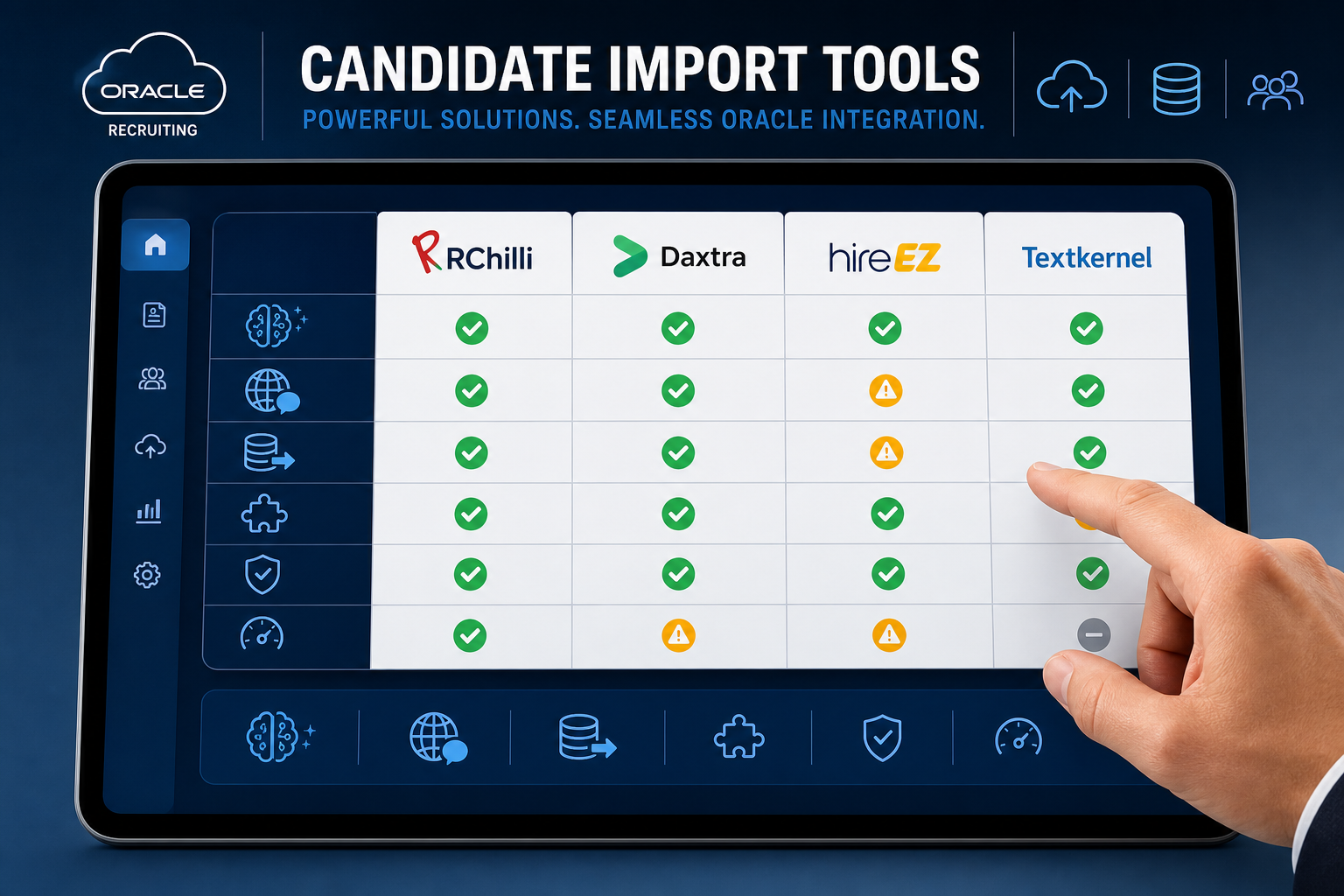
Quick guide: 4 top candidate import tools for Oracle recruiting systems
- RChilli: The top choice for Oracle-native candidate profile import and ATS migration with AI-powered parsing
- Daxtra: Multilingual parsing that covers over 40 languages for global recruiting needs
- hireEZ: Open web sourcing and ATS rediscovery for candidate acquisition
- Textkernel: Resume parsing with Oracle Recruiting Cloud integration for candidate conversion
How we chose the top candidate import tools for Oracle recruiting
If you're managing an Oracle-based recruiting system, you already know that getting candidate data into your ATS accurately—and quickly—makes all the difference. We evaluated tools that integrate directly with Oracle Talent Acquisition, focusing on what matters most to enterprise HR teams.
- Oracle-native integration: How well does the tool connect with Oracle HCM and Oracle Recruiting Cloud without requiring custom development?
- Parsing accuracy: Can the tool extract data from resumes across multiple formats and languages while maintaining field-level precision?
- Migration capabilities: Does it support bulk uploads and historical database reprocessing for organizations moving from legacy systems?
- Skill extraction depth: How many skills can the tool identify and normalize against standardized taxonomies?
- Candidate experience: Does the import process simplify applications and reduce drop-offs?
- Compliance and security: Are GDPR, SOC 2, and other enterprise security standards supported?
The 4 top candidate import tools for Oracle Talent Acquisition
1. RChilli: Top overall candidate import tool for Oracle recruiting automation
RChilli gives you deep Oracle integration through its Enhanced Candidate Profile Import, designed specifically for Oracle Recruiting Cloud and Oracle HCM environments. Unlike basic parsing tools, RChilli captures data across 200+ fields and supports custom mapping that aligns with your specific Oracle configurations.
What sets RChilli apart for Oracle users is the combination of AI-powered extraction with production-ready workflows. You can process bulk uploads, reprocess legacy databases, and standardize candidate data—all without replacing your existing Oracle modules. The tool integrates in under 30 minutes and includes degree normalization, LOV integration, and detailed parsing logs for full transparency.
RChilli also offers a browser assistant that lets recruiters upload resumes directly to requisitions, rank candidates using AI, and reduce the time spent on profile creation. For organizations migrating from Taleo to Oracle Recruiting Cloud, RChilli supports complete data transfer with field mapping that preserves historical information.
RChilli features
- Enhanced Candidate Profile Import: Automatically creates Oracle candidate profiles through advanced parsing, supporting bulk uploads and custom field mapping across 200+ data points
- AI-powered skill extraction: Identifies and normalizes 15+ skills per resume against a taxonomy of over 3 million skills, improving search accuracy and matching precision
- Degree normalization: Standardizes educational qualifications so that "B.Tech," "Bachelor of Technology," and similar variations appear consistently in your database
- Full database reprocessing: Upgrades legacy resume databases with updated configurations, giving you standardized historical data without starting from scratch
- Simplified apply flow: Reduces candidate drop-offs with drag-and-drop uploads, email parsing, and one-click apply functionality
- Parsing logs and reporting: Gives you full visibility into extraction performance, helping you monitor accuracy and maintain compliance standards
RChilli pros and cons
Pros:
- Oracle-native integration that works directly inside Oracle HCM and Recruiting Cloud workflows
- Supports 40+ languages with AI-powered deep learning extraction
- FedRAMP Ready designation for organizations with strict security requirements
Cons:
- Advanced features like database reprocessing require configuration time during initial setup
- Custom field mapping may need coordination with your Oracle administrator for complex implementations
- Browser assistant requires separate installation for recruiter workstations
2. Daxtra: Multilingual parsing for global recruiting operations
Daxtra Parser extracts candidate data from resumes in over 40 languages, making it an option for organizations recruiting across multiple regions. The tool converts CV and job data into structured XML or JSON formats, covering 150+ data fields including personal information, skills, and education history.
Daxtra includes sector-specific taxonomies for industries like IT, finance, healthcare, and engineering. The tool supports both on-premise and cloud-hosted deployment options, giving you flexibility in how you integrate it into your recruitment stack.
Daxtra features
- 150+ field extraction: Captures candidate and job data across personal details, skills, work history, and qualifications
- Industry taxonomies: Includes native taxonomies for IT, finance, healthcare, legal, and engineering sectors
- Flexible deployment: Available as on-premise installation or cloud-hosted service with REST and SOAP API support
Daxtra pros and cons
Pros:
- Parses resumes in 40+ languages with geographic name and address format recognition
- Supports custom taxonomy additions alongside native skill libraries
- Offers multiple output formats including XML and JSON
Cons:
- Oracle-specific integration requires additional development work
- Bulk migration features are not as specialized for Oracle environments
- No native Oracle login or workflow integration included by default
3. hireEZ: Open web sourcing with ATS rediscovery
hireEZ focuses on candidate sourcing from across the open web combined with rediscovery of existing talent in your ATS. The platform includes Oracle as a partner integration, allowing you to connect sourced candidates with your Oracle recruiting workflows. hireEZ emphasizes applicant screening and AI-powered matching to surface qualified candidates faster.
The platform includes scheduling automation, high-volume nurturing campaigns, and recruiting event management. For teams looking to expand their candidate pipelines beyond direct applications, hireEZ adds sourcing capabilities that complement your Oracle import processes.
hireEZ features
- Open web sourcing: Sources candidates from professional networks and public profiles across the internet
- ATS rediscovery: Finds qualified candidates already in your applicant tracking system who may have been overlooked
- Applicant screening: Automates resume screening with AI phone screening for faster shortlisting
hireEZ pros and cons
Pros:
- Combines sourcing and ATS integration in a single platform
- Includes candidate nurturing and campaign automation features
- Offers scheduling automation for interview coordination
Cons:
- Primary focus is sourcing rather than parsing or migration
- Resume parsing capabilities are not as deep as dedicated parsing tools
- Oracle integration is partner-level rather than Oracle-native
4. Textkernel: Resume parsing for Oracle Recruiting Cloud
Textkernel Parser integrates with Oracle Recruiting Cloud to simplify the candidate application process. Candidates can upload resumes with one click, and the tool extracts key details to populate profile fields automatically. Textkernel supports parsing in 29 languages and emphasizes improving candidate conversion rates on career sites.
The tool focuses on building structured talent databases that improve recruiter search capabilities. Textkernel reports that clients using their parser have seen candidate conversion rate increases, which they attribute to reduced application friction.
Textkernel features
- One-click apply: Simplifies the application process by extracting resume data to auto-populate candidate profiles
- 29-language parsing: Supports multilingual resume parsing powered by deep learning models
- Structured talent database: Organizes extracted candidate information for enhanced search and discovery
Textkernel pros and cons
Pros:
- Direct Oracle Recruiting Cloud integration available
- Focuses on candidate experience and conversion rate optimization
- Includes skill and profession taxonomies for data enrichment
Cons:
- Fewer languages supported compared to some alternatives
- Bulk migration and database reprocessing features are not as prominent
- Oracle-specific features like LOV integration require additional setup
Comparison table: Top candidate import tools for Oracle Talent Acquisition
| Tool | Oracle-Native Integration | Languages Supported | Bulk Migration Support |
|---|---|---|---|
| RChilli | ✓ | 40+ | ✓ |
| Daxtra | ✗ | 40+ | ✗ |
| hireEZ | ✗ | Limited | ✗ |
| Textkernel | ✓ | 29 | ✗ |
What makes Oracle candidate import different from general resume parsing?
Oracle recruiting systems have specific data structures, field mappings, and workflow requirements that generic parsing tools don't address out of the box. When you're importing candidates into Oracle HCM or Oracle Recruiting Cloud, you need a tool that understands Oracle's LOV (List of Values) fields, degree normalization standards, and custom configuration options.
General resume parsers extract data into generic formats, leaving you to manually map fields to your Oracle system. This creates extra work and introduces inconsistencies that affect search accuracy and reporting. Oracle-specific import tools like RChilli handle this mapping automatically, ensuring that extracted data aligns with your existing Oracle configurations.
For organizations migrating from legacy systems—including Taleo—Oracle-native tools also support historical data reprocessing. This means you can standardize and enrich your existing candidate database without losing information or starting over.
How do you evaluate parsing accuracy for Oracle ATS migration?
Parsing accuracy goes beyond extracting basic contact information. For Oracle migrations, you need to evaluate how well a tool handles:
- Field coverage: Does the parser extract data for all the fields your Oracle system uses, including custom fields?
- Skill normalization: Can the tool map extracted skills to standardized taxonomies so that "JavaScript," "JS," and "ECMAScript" all appear consistently?
- Education standardization: Does degree normalization ensure that equivalent qualifications are grouped together in searches?
- Error handling: What happens when parsing fails? Does the tool provide logs and fallback options?
RChilli addresses these requirements with parsing logs that give you visibility into extraction performance, along with fallback options that ensure candidate data isn't lost when parsing encounters unusual resume formats.
Why RChilli is the top candidate import tool for Oracle recruiting automation
RChilli stands out for Oracle users because it's built specifically for Oracle workflows. The Enhanced Candidate Profile Import connects directly to Oracle Recruiting Cloud and Oracle HCM, eliminating the integration gaps that require custom development with other tools.
For enterprise HR teams handling high-volume recruiting, RChilli's bulk import and database reprocessing capabilities mean you can modernize legacy data while continuing to process new applications. The 40+ language support covers global recruiting needs, and the 3 million+ skill taxonomy ensures accurate matching across industries.
RChilli also delivers on compliance—with FedRAMP Ready designation, SOC 2, ISO 27001, and HIPAA support—giving you enterprise-grade security without sacrificing parsing performance. When your Oracle recruiting system needs accurate, structured candidate data at scale, RChilli gives you the Oracle-native integration and AI-powered extraction to make it happen.
Explore RChilli's Enhanced Candidate Profile Import for Oracle to see how it fits your recruiting workflow.
FAQs about Oracle candidate import tools
What is candidate profile import in Oracle Recruiting Cloud?
Candidate profile import is the process of creating candidate records in Oracle Recruiting Cloud by extracting data from resumes or existing databases. RChilli automates this process with AI-powered parsing that captures 200+ fields and maps them directly to your Oracle configurations.
This eliminates the need for candidates to manually enter repetitive information and gives recruiters structured, searchable profiles from the start.
Can I migrate historical candidate data to Oracle HCM?
Yes, tools like RChilli support full database reprocessing, which allows you to standardize and enrich legacy resume data. This is particularly valuable for organizations moving from Taleo or other ATS platforms to Oracle Recruiting Cloud.
RChilli's bulk import via FTP supports one-time migrations along with ongoing parsing for new applicants.
How many languages do Oracle candidate import tools support?
RChilli supports 40+ languages with AI-powered deep learning extraction. This multilingual capability is essential for enterprise organizations recruiting across multiple countries and regions.
Language support includes geographic formatting for names, addresses, and dates, ensuring accurate data capture regardless of resume origin.
What's the difference between resume parsing and candidate profile import?
Resume parsing extracts data from resume documents into structured formats. Candidate profile import goes further by mapping that extracted data into specific ATS fields and workflows.
RChilli combines both functions with Oracle-native integration, creating complete candidate profiles that align with your Oracle HCM configurations rather than generic data exports that require additional processing.
How do candidate import tools improve recruiter productivity?
By automating data extraction and profile creation, candidate import tools reduce the time recruiters spend on administrative tasks. RChilli's Enhanced Candidate Profile Import can reduce resume screening time by up to 70-80%, giving recruiters more time to focus on candidate engagement and hiring decisions.
The simplified apply flow also improves candidate completion rates, meaning recruiters work with more complete profiles from the start.




Leave a Reply