

How to Clean Oracle HCM Candidate Data in 2026
by Lovepreet Singh
Duplicate candidate records, outdated contact details, and inconsistent skills mapping are three of the fastest ways to slow down your Oracle HCM Recruiting workflows. When your recruiters search for talent, the results they get are only as good as the candidate data behind them.
This guide walks you through a practical, step-by-step approach to cleaning Oracle HCM candidate data. You will learn how duplicates form, why records go stale, and what you can do to build an ongoing data hygiene routine that keeps your talent pool accurate and ready for action.
RChilli's AI-powered data hygiene solutions for Oracle HCM help enterprise HR teams automate many of these steps, from deduplication to profile enrichment. We will reference those capabilities where relevant throughout the guide.
Key Takeaways: How to Clean Oracle HCM Candidate Data
- Duplicate records in Oracle HCM Recruiting typically result from multiple applications, inconsistent naming, and bulk imports.
- Oracle's built-in duplicate check feature can flag potential matches, but you still need clear merge rules.
- Standardized data entry formats for names, skills, and job titles prevent most new duplicates at the source.
- RChilli's Full Database Reprocessing enriches legacy profiles by extracting missing fields from stored resumes.
- A quarterly data hygiene schedule keeps your Oracle HCM database accurate and ready for AI-driven recruiting.
Why Does Candidate Data Quality Matter in Oracle HCM?
Your Oracle HCM Recruiting module stores thousands of candidate profiles. Over time, those profiles collect errors. Contact details become outdated, skills go untagged, and the same candidate can appear under two or more records with slightly different names.
Poor data quality has a direct impact on recruiter productivity. When search results return duplicates or incomplete profiles, your team spends time sorting records instead of engaging candidates. According to a 2025 SHRM report on data readiness in HR, flawed HR data creates inaccurate forecasts, degrades AI model performance, and erodes trust in technology-driven decision-making.
Clean candidate data also feeds directly into AI features like semantic search, candidate matching, and automated ranking. If the underlying records are incomplete, even the most advanced algorithms will return weak results.
What Causes Duplicate Candidate Records in Oracle HCM?
Duplicates rarely appear from a single event. They build up gradually as a result of several common patterns in Oracle HCM Recruiting environments.
Multiple Applications from the Same Candidate
A candidate may apply to three different requisitions over several months. If they update their name format (e.g., "Rob" vs. "Robert") or use a different email address each time, Oracle creates separate candidate records for what is actually one person.
Bulk Resume Imports and Data Migrations
Migrating candidate data from a legacy ATS or running a bulk import through file uploads often introduces duplicates. Records that existed in the old system may already be present in Oracle HCM under a slightly different format. Without pre-import validation, these duplicates enter the database undetected.
Inconsistent Data Entry by Recruiters
When recruiters create candidate profiles manually, even small formatting differences cause issues. "John A. Smith" and "John Smith" may both point to the same individual, but Oracle treats them as separate records unless a duplicate check is configured.
Lack of Standardized Naming Conventions
Without enforced rules for capitalization, abbreviation, and field formatting, the same skill, job title, or credential can appear in dozens of variations. These inconsistencies fragment your candidate pool and reduce the accuracy of search results.
How to Use Oracle's Built-In Duplicate Check Feature
Oracle HCM Recruiting includes a native candidate duplicate check that compares new records against existing profiles. You can configure this check to run automatically whenever a new candidate is created or an application is submitted.
How to Configure Automatic Duplicate Detection
Navigate to Setup and Maintenance, then search for "Recruiting and Candidate Experience" in the functional area. Enable the duplicate check profile and define which fields Oracle should compare. Most implementations use a combination of first name, last name, email, and phone number.
Once active, Oracle flags potential matches and presents them to the recruiter during the hiring flow. The recruiter can then review the flagged profiles and decide whether to merge or keep them separate.
Running Manual Duplicate Checks
For existing records, you can also run manual duplicate checks from a candidate's profile page. This is useful during periodic database audits where you want to clean up records that were created before automatic duplicate detection was enabled.
Limitations of Native Duplicate Detection
Oracle's built-in tool compares fields based on exact or near-exact matches. It may miss duplicates where candidates used different email domains, abbreviated their names, or entered incomplete contact information. For deeper deduplication, you may need supplementary tools that use fuzzy matching and AI-based comparison logic.
Step-by-Step Process for Cleaning Oracle HCM Candidate Data
Cleaning your candidate database is not a one-afternoon task. Use the following structured approach to tackle it in manageable phases.
Step 1: Audit Your Current Database
Start with a full audit. Export a report of all candidate records and review the following: total record count, percentage of records missing key fields (email, phone, skills), number of flagged duplicates, and the age distribution of records (how many are older than two years).
This baseline report gives you a clear picture of the scope of work ahead. Focus your first cleanup effort on the highest-impact area, whether that is duplicates, missing fields, or outdated contact details.
Step 2: Deduplicate Existing Records
Use Oracle's manual duplicate check to scan segments of your database in batches. Start with candidates who applied in the last 12 months, since those profiles are most likely to appear in active searches. Flag matches, review them, and merge confirmed duplicates.
When merging, preserve the most complete and most recent data from each record. Oracle allows you to select which profile becomes the primary record and which data fields carry over during the merge.
Step 3: Standardize Data Entry Fields
Prevent new duplicates by enforcing data entry standards going forward. Define formatting rules for candidate names (full legal name, proper capitalization), phone numbers (country code + area code), email addresses (lowercase), and skills tags (mapped to a controlled vocabulary).
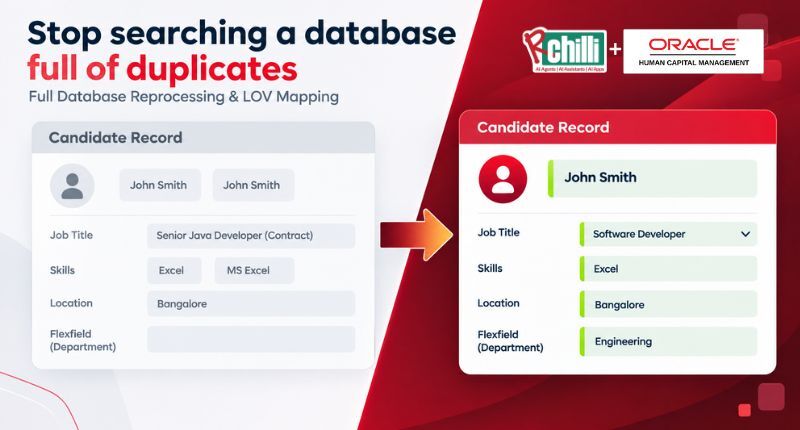
Oracle HCM supports List of Values (LOV) configurations that restrict free-text input and guide recruiters toward standardized options. RChilli's LOV mapping takes this further by aligning your Oracle LOV fields with an updated skills and job title taxonomy.
Step 4: Enrich Incomplete Profiles
Many older candidate records contain only a name and an email address. The original resume may sit in the system, but its contents were never fully extracted into the structured profile fields.
RChilli's Essential Data Enhancer solves this by reprocessing stored resumes and auto-populating fields like education, certifications, skills, and work history. This turns incomplete records into searchable, enriched profiles without requiring any action from the candidate.
Step 5: Reprocess Legacy Data
If your Oracle HCM database includes records migrated from a previous system, those legacy profiles may use outdated taxonomy or formatting standards. RChilli's Full Database Reprocessing extracts, enriches, and restructures legacy data to meet your current taxonomy standards.
This is especially valuable after a system upgrade or migration from Taleo to Oracle Recruiting Cloud, where data structures may have shifted significantly.
Step 6: Archive or Remove Stale Records
Not every record in your database needs to stay active. Candidates who last applied five or more years ago and have not responded to re-engagement outreach are unlikely to remain viable. Archiving these records reduces database clutter and improves search performance.
Before archiving, confirm compliance with your organization's data retention policies and GDPR or local privacy regulations. Oracle HCM allows you to set retention rules that automate the archival of records older than a defined threshold.
How to Standardize Skills and Job Titles in Oracle HCM
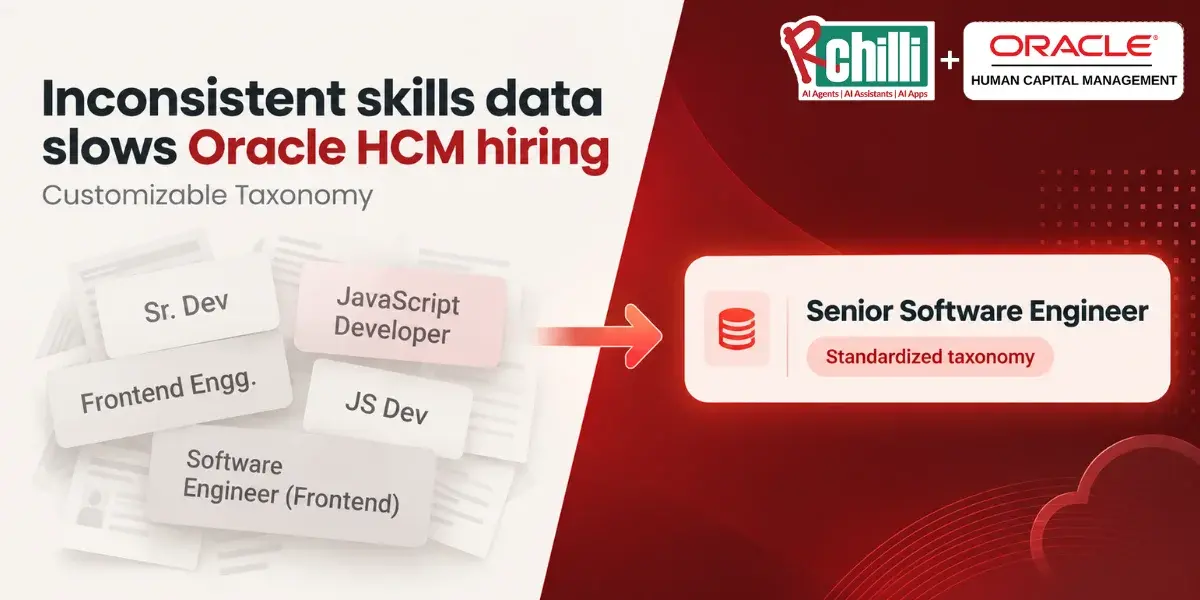
Inconsistent skills data is one of the most overlooked causes of poor candidate search results. If "Project Management" appears as "Proj Mgmt," "PM," and "Project Mgt" across different records, your searches only return a fraction of the qualified candidates.
Why a Controlled Taxonomy Matters
A controlled taxonomy maps all variations of a skill or job title to a single, standardized term. This means a recruiter searching for "Project Management" will find every candidate who holds that skill, regardless of how it was originally entered.
RChilli's Taxonomy includes over 3 million skills and 2.4 million job profiles, giving you an extensive vocabulary to standardize candidate data. It maps free-text entries to recognized terms, reducing fragmentation and improving match accuracy.
Mapping List of Values (LOV) in Oracle HCM
Oracle HCM uses List of Values fields to control input options for items like degree types, skills, and job families. When these LOV fields are mapped to an up-to-date taxonomy, recruiters are guided toward consistent entries every time they create or edit a candidate profile.
You can configure LOV mappings through Oracle's Setup and Maintenance area. For a more automated approach, RChilli's LOV mapping solution synchronizes your Oracle LOV fields with current industry terminology.
How to Build a Recurring Data Hygiene Schedule for Oracle HCM
A one-time cleanup is a good start, but data quality degrades quickly without an ongoing maintenance routine. Set up a recurring schedule that covers the following activities at regular intervals.
Weekly Tasks
Review new candidate records created in the past seven days. Check for obvious duplicates flagged by Oracle's automatic detection. Verify that required fields (email, phone, skills) are populated on new profiles.
Monthly Tasks
Run a broader duplicate scan on all records updated in the past 30 days. Review LOV mapping reports to catch new skill or title variations that need standardization. Check for bounced emails or invalid phone numbers that signal outdated contact details.
Quarterly Tasks
Conduct a full database audit. Measure key metrics such as duplicate rate, field completion rate, and record age distribution. Compare these metrics against your previous quarter to track progress. Identify records eligible for archival based on your retention policy.
RChilli's data hygiene solutions for Oracle HCM can automate several of these recurring tasks, from reprocessing legacy resumes to enriching incomplete profiles on a scheduled basis. This reduces the manual effort your team needs to invest and keeps data quality consistent.
How Does Data Enrichment Improve Candidate Matching in Oracle HCM?
Candidate matching algorithms rely on structured data fields to compare profiles against job requirements. When those fields are empty or inconsistent, the algorithm cannot make accurate comparisons.
Enrichment fills those gaps. By extracting additional information from stored resumes and appending it to the structured profile, you give matching algorithms more data points to work with. The result is a higher match accuracy and fewer irrelevant results in recruiter searches.
RChilli's Resume Enrichment capabilities go beyond basic field extraction. The system enriches candidate profiles with normalized skills, updated job titles, and verified credentials, giving your Oracle HCM database the depth needed for accurate AI-driven matching and ranking.
How to Maintain Data Privacy and Compliance During Cleanup
Cleaning candidate data involves accessing and modifying personal information, which means your data hygiene process must comply with privacy regulations like GDPR, SOC 2, and HIPAA (for healthcare organizations).
Key Compliance Considerations
Before merging or archiving records, confirm that you have proper consent documentation for each candidate. If consent has expired, the record may need to be deleted rather than archived. Oracle HCM supports role-based access controls that limit who can view, edit, or merge candidate data.
Audit logs are also critical. Every merge, deletion, and update should be tracked to maintain a complete record of what changed, when it changed, and who authorized it. Oracle HCM's audit trail functionality supports this requirement natively.
Redacting Sensitive Information
During data cleanup, you may encounter profiles that contain personal identifiers like photographs, dates of birth, or nationality details. RChilli's Redact and Design solution automatically masks sensitive fields, ensuring your cleaned database supports fair, skills-based evaluation and meets privacy compliance standards.
How to Measure the Success of Your Data Hygiene Efforts
Once your cleanup process is running, you need metrics to confirm it is working. Track the following indicators on a quarterly basis.
Duplicate Rate
Measure the percentage of candidate records flagged as potential duplicates. A healthy Oracle HCM database typically maintains a duplicate rate below 5%. If your rate is higher, increase the frequency of your deduplication scans.
Field Completion Rate
Track how many candidate profiles have all key fields populated: name, email, phone, skills, education, and work history. Aim for a completion rate above 80% for profiles created in the last two years.
Recruiter Search Satisfaction
Survey your recruiting team periodically to gauge whether search results have improved. Are they finding more relevant candidates? Are they spending less time sorting through duplicates? Recruiter feedback gives you a qualitative measure to pair with your quantitative metrics.
Time-to-Fill Impact
Compare your average time-to-fill before and after implementing data hygiene practices. Cleaner data should translate into faster candidate identification, shorter review cycles, and an improved time-to-fill rate over successive quarters.
In Conclusion: A Clean Oracle HCM Database Powers Smarter Recruiting
Cleaning your Oracle HCM candidate data is not a one-time project. It is an ongoing discipline that requires clear processes, the right tools, and regular measurement. By deduplicating records, standardizing data entry, enriching incomplete profiles, and building a recurring hygiene schedule, you set your recruiting team up for faster, more accurate hiring decisions.
RChilli's data hygiene solutions for Oracle HCM automate many of these tasks, from full database reprocessing to profile enrichment and LOV mapping. If your team is ready to move from reactive cleanup to proactive data quality management, RChilli gives you the tools to get there.
FAQs about How to Clean Oracle HCM Candidate Data
What is candidate data hygiene in Oracle HCM?
Candidate data hygiene refers to the process of auditing, deduplicating, enriching, and standardizing candidate records in your Oracle HCM Recruiting database. The goal is to keep profiles accurate, complete, and formatted consistently so recruiters can trust search results and matching outputs.
How often should I clean my Oracle HCM candidate database?
A quarterly full audit paired with weekly and monthly spot checks is a practical cadence for most organizations. Weekly checks focus on new records, monthly checks scan for broader inconsistencies, and quarterly audits measure overall database health and identify records for archival.
Can RChilli automate deduplication in Oracle HCM?
RChilli's Essential Data Enhancer identifies and removes duplicate entries while enriching incomplete profiles. Combined with RChilli's resume parsing for Oracle HCM, it automates much of the cleanup work that recruiters would otherwise handle manually.
What fields should I prioritize when cleaning candidate records?
Focus on the fields that drive search and matching accuracy: candidate name, email, phone number, skills, education, and work history. These are the data points your recruiting team relies on most when identifying and evaluating candidates.
How does RChilli's Taxonomy improve Oracle HCM data quality?
RChilli's Taxonomy maps free-text skills and job titles to standardized terms drawn from a library of over 3 million skills. This eliminates inconsistencies like "Proj Mgmt" vs. "Project Management," ensuring your Oracle HCM searches return complete, accurate candidate results.
Does cleaning candidate data help with compliance requirements?
Yes. Accurate, auditable candidate records are a requirement under regulations like GDPR and SOC 2. RChilli's Redact and Design solution adds a compliance layer by masking sensitive personal identifiers, supporting fair and privacy-compliant hiring practices in Oracle HCM.



Leave a Reply